A.I.101 Part #2: Demystifying AI for Edu...

Part 3 On Your Own

Only editable by group admins

  • Last updated January 11, 2024 at 4:36 AM by sweethometc
  • Evidence visible to public
Give the tools a try!

Beyond the Episode…

  1. Try using one of the AI tools (ChatGPT, Google Bard, or Microsoft Bing) to create one or more item(s) from the list below.  Be sure to use multiple prompts to refine the response so you get what you might actually use in your class.
    1. An email letter to a parent of a student who is struggling with topic/standard/ or unit in your subject
    2. A letter of reference about a student who (for example) has good character, works really hard to improve grades, and was recognized as “citizen of the month”
    3. Develop a lesson plan for a topic in your subject within your grade level.  Consider prompting it to provide tables, charts, correct answers, or rubrics

Evidence of Learning...

  1. Please provide a brief paragraph or two that explains the process you used to get the final response.
  2. Upload a picture/screenshot to show a response you found interesting.

All posted evidence

Letter to parent

I attempted to create a letter to a parent for a student who has been struggling with their behavior in my class. I began asking for a letter to a parent regarding student behavior who has been fooling around, not paying attention, not following rules in the gym. From there I received a long letter with a lot of big words. I knew that sending this home the parent would probably not completely understand it and would be too long and not to the point. So I asked GPT to shorten up the letter while also using more clear and specific words in regards to behavior. Right away the letter was more clear and to the point. By adding the students name and changing out a few words more specific to PE, I was able to find what I wanted. Here is the letter, copy and pasted:

Hi,
I am Kaidens PE teacher and wanted to take a moment to touch base and discuss some recent observations regarding Kaiden's behavior in class. He has been exhibiting behavior not aligned with classroom expectations during Phys Ed, and there have been instances where he seemed disengaged, even when prompted by myself or co-worker.

Maintaining a positive and focused classroom environment is crucial for the learning experience of all students. I believe that with your support at home, we can work together to address and improve Kaiden’s behavior.

Your support in this matter is highly appreciated, and I look forward to working together to create a conducive learning environment for Kaiden.

diana-calandra Over 1 year ago

How It's Going

melindadi Almost 2 years ago

How it started

melindadi Almost 2 years ago

Library Lesson Using Bing

I used Microsoft's Bing Copilot to brainstorm ideas and create a lesson plan for my elementary library. First, I asked for common topics for 3rd graders to study in March. A few holidays and celebrations came up, and I chose Women's History Month. I asked about important contributions by women, and got a long list of mostly women who lived over 100 years ago. Then I asked for careers in the past 30 years with influential women, and went on to ask for picture books written on that topic within the past 6 years. I finally settled on a picture book I currently own called Shark Lady, which is about Eugenie Clark and her work as a marine biologist. I then asked Bing to create a lesson plan for using that book, and I emailed it to myself after tweaking it for a shorter library lesson.

I have used Bing before on my phone, usually to answer quick questions, or to create lists. Using the microphone feature is good for this. It was interesting to really delve into one topic, repeatedly changing and adding to the search requests to get what I wanted. I went back and forth between bing.com on my MacBook, and the Bing app on my phone. I found that the microphone wasn't as useful for this type of work, because it would turn off if I paused to think about my question. It was easy enough to switch to typing. 

I like that Bing offers links to the sources it used to collate the information, and I followed some of the links for different purposes. I looked at the book covers, pictures of Eugenie Clark, and YouTube videos about sharks. I like that all of the information I asked for but didn't immediately use is stored there, and I can go back to it at any time. It's all in one long conversation thread as long as I didn't choose to start a new conversation. This was rather time-consuming, because I could have started with Google for the initial lists. However, the information wouldn't be stored in one cohesive package. I also like that Bing has the ability to write a lesson plan in an understandable format, and that links for what I need are built in. I look forward to practicing this process in the future.

melindadi Almost 2 years ago

Project Directions/Rubric Part 1.

I choose to use Chat GPT to help with creating project directions and a rubric for a Global 9 project called; "The Caste System in Six Words". The idea was to use Ernest Hemmiway's famous six-word poem idea and apply that to the Caste system of India. I initially wrote: "Hello! Please create directions for grade 9 high school students in a Global 9 class for the following assignment. Create a "six word poem", which was made famous by Ernest Hemingway. The students should create a "six word poem" that has the Hindu Caste system as the focus of the poem. They should Canva to create their poem with visuals to match.
My "conversation" with Chat GPT included at least 5 refinements asking Chat GPT to get some of the formatting requests dialed in, but I wasn't able to fully get the formatting correct, but I was totally able to work with results. I used Chat GPT in a very simple way for this particular task, but I have had many successful interactions with Chat GPT to say this is very reliable assistance with many tasks!

link to chat history.
https://chat.openai.com/share/642c0d44-523b-4746-b8b8-219eae6feb0e
naryanp Almost 2 years ago

Credit Score Lesson Plan

I asked Chapt GPT to create a “write a lesson plan for high school juniors on what a credit score is (the parts) and how to build a great score.” ChatGPT produced a lesson that started with a discussion, the teacher sharing the aspects of the credit score (percents and factors), and then the students were to have a research component in groups (each group would focus on a component and become experts). I really like the last aspect of the lesson as students are doing a deep dive on one aspect and they will then receive the deep dive in a presentation from their peers. 

I then asked it “craft the lesson plan so they are to produce an info graphic”
 The lesson didn’t change much, but this was added to the lesson on a second day...
Creating the Infographic (25 minutes):
  1. Provide poster boards or access to digital graphic design tools.
  2. Allow students time to design their infographics based on the information they gathered during the research phase.
  3. Encourage creativity and effective visual communication.
  4. Circulate among groups to offer assistance and answer questions as needed.
  So this added in a second day, which was nice as that is how much I personally spend on the intro of this topic. I like the idea of gaining ideas that I can alter in some way, as it can be very tedious to create lesson plans that I personally think are effective but they might all be very similar. 
dtracz Almost 2 years ago

here is a link to our chat

Openai

ChatGPT

ChatGPT is a free-to-use AI system. Use it for engaging conversations, gain insights, automate tasks, and witness the future of AI, all in one place.
john-elliott Almost 2 years ago

Letter of recomendation

Writing these types of letters is a real grind! I do not look forward to it! I used to the following prompts: 

"letter of recommendation for a student who took AP Biology. Student was able to work well with others. Include an anecdote about excelling on DNA extraction lab"

and then...

"
Five paragraphs - paragraph one introduction, paragraph 2 DNA extraction lab excellence, paragraph 3 willing to work with diverse populations, and paragraph 4 relentless studying, paragraph five conclusion"

by this time, the letter was really starting to look good. I added a prompt to include the student's name, which it did throughout the document, and it did a solid job of generating the basic spine of a letter. I almost felt a sigh of relief watching the letter appear, because teaching AP Biology, and Computer Science, I write about 15-20 letters a year. 

This is a great use, an area of the profession that many do not think of, and I do not do all the time, but is useful. now... could I use it write reflections for Teacher Center Digital Badges...?
john-elliott Almost 2 years ago

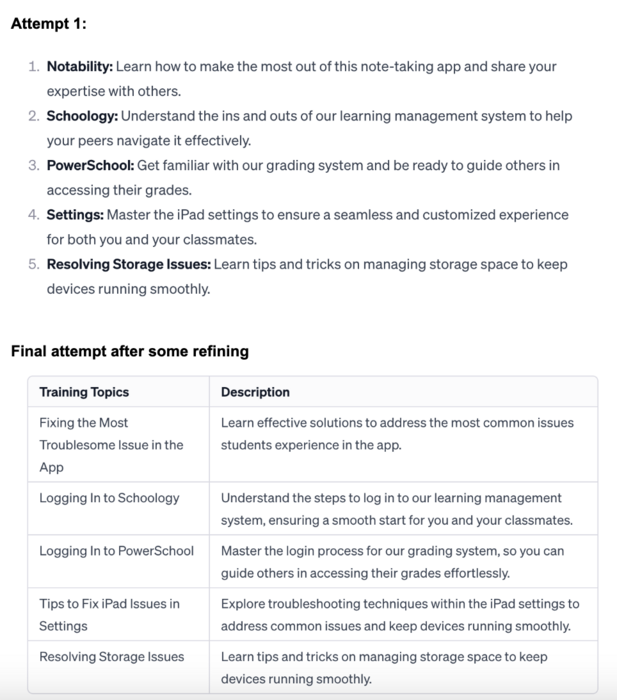
This image shows a part of my letter. The top was attempt 1 and the bottom was attempt 2 after some refining of the initial response

brent-peterson Almost 2 years ago

Part 3 Response

I had Chat GPT help me in crafting a letter to students interested in joining a tech support team at the middle school.  I started by asking for a letter gauging their interest with some general guidelines, regarding what the commitment would entail. I got a really good starting point back from the chatbot. I then wanted to add some specifics about what types of training we would give them, so I listed some apps to see what ChatGPT would tell me about those apps. It was very general, so I wanted it to be more specific and talk about the troubleshooting of the applications and iPad tools that I would want students to learn, after going through multiple prompts to get it to revise some of a bulleted list, it gave me some pretty good outputs. (See Image in additions Upload)

Overall.  I would much rather start with getting the language from ChatGPT and editing, than having to sit here and struggle to come up with how I want to word my letter. It is a great time-saving tool.
brent-peterson Almost 2 years ago

Image of results

cutzig Almost 2 years ago

Liberta Part III- Chat GPT for lessons

For this final task I used “Chat GPT” to search for a lesson plan idea.  I used specific words and prompts to set the parameters in a very narrow way.  I searched “Create a one-day lesson plan on Deng Xiaoping (45 min total) with use of student I Pads”. I started by simply saying create a lesson on Deng Xiaoping.  I knew, after watching the video, that I should get more parameters.  But I wanted to see step by step how the response changed as I added and specified items.  This is a topic I find hard to teach because the students are not really into it.  Even with footage of Tiananmen Square, students completely check out when it comes to the Four Modernizations.  After the initial search (general one), I got some ideas.  I then added that it was a 45-minute class period.  This broke down the tasks more and even offered times each should take.  I then added “with use of student I Pads”.  This then redrafted the response to include the technology piece.  It had the teacher sharing articles and resources electronically and chatting via the I Pad as a part of the lesson.  Like I mentioned earlier, I like to put my spin and flavor on the lesson.  But as a jumping off point in coming up with new lesson ideas this is a fascinating tool.  
dliberta Almost 2 years ago