A.I.101 Part #2: Demystifying AI for Edu...

Part 3 On Your Own

Only editable by group admins

  • Last updated January 11, 2024 at 4:36 AM by sweethometc
  • Evidence visible to public
Give the tools a try!

Beyond the Episode…

  1. Try using one of the AI tools (ChatGPT, Google Bard, or Microsoft Bing) to create one or more item(s) from the list below.  Be sure to use multiple prompts to refine the response so you get what you might actually use in your class.
    1. An email letter to a parent of a student who is struggling with topic/standard/ or unit in your subject
    2. A letter of reference about a student who (for example) has good character, works really hard to improve grades, and was recognized as “citizen of the month”
    3. Develop a lesson plan for a topic in your subject within your grade level.  Consider prompting it to provide tables, charts, correct answers, or rubrics

Evidence of Learning...

  1. Please provide a brief paragraph or two that explains the process you used to get the final response.
  2. Upload a picture/screenshot to show a response you found interesting.

All posted evidence

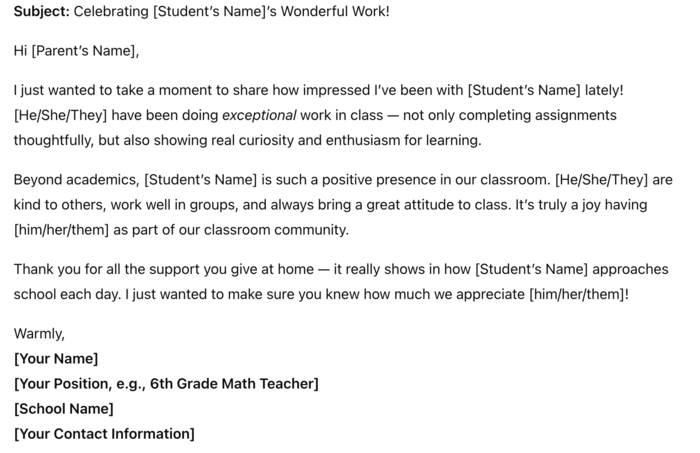
Explanation to go along with picture of email.

I originally asked for ChatGPT to compose an email about a student I am concerned about/struggling in the math classroom.  I then asked it to change the tone to make it more "friendly" since it was very formal.  It came up with a good email, but I thought, "wouldn't it be nice to compose an email to a parent about a student that is doing amazing in class?"  I know those parents don't hear from us teachers enough.  I asked ChatGPT so compose an email from a teacher to a parent about a student doing exceptional work, and that is also a great person.  I posted evidence of that email. 
rachaelsemrau About 1 month ago

Picture of email- explanation in separate post.

rachaelsemrau About 1 month ago

ChatGPT for email

I used ChatGPT to create an email for a parent about their child who is struggling in French class. At first, the email was very broad. Then, I added in more specifics, such as struggling with our new vocabulary and verb tense and ChatGPT added that into the email. I liked this second email a lot better because while it still provided blanks for me to fill in, most of the email was pre-written, which can save tons of time. 
riley-walker About 2 months ago

Posted Image

There was a problem processing this image, the file may be of an invalid format.

Uploaded Filename: Screenshot 2025-10-17 at 1.48.48 PM.png

riley-walker About 2 months ago

Using ChatGPT, I made a group activity worksheet for my gr. 10 earth science course. I had AI edit it several times to create what I wanted.

mricupito 2 months ago

A prompt I found interesting.

There was a problem processing this image, the file may be of an invalid format.

Uploaded Filename: Screenshot 2025-10-03 at 12.47.16 PM.png

pawlak-jayna 2 months ago

A prompt I found interesting because it refined the answer.

pawlak-jayna 2 months ago

Part 3

I decided to use ChatGPT to create an email to the parent of a student who is struggling in my class. My first prompt asked for a professional but supportive email that explained the student’s challenges in staying focused and suggested next steps. The initial draft was helpful, but a little too generic. I refined my prompts by asking the AI to “make the tone encouraging while still emphasizing accountability” and to “add specific suggestions the student can try in class and at home.” I then rephrased my prompt to be more directed towards a student's struggle to stay focused. With these adjustments, the final draft felt much more personal and practical.

 Through this process, I learned that the quality of the AI’s response depends on how clearly I word the prompt. Generally speaking, the more detail I provide, the better the response I get. The first attempt gave me a decent framework, but it wasn’t until I added details about tone, content, and student needs that the draft became usable. 
pawlak-jayna 2 months ago

Posted Image

There was a problem processing this image, the file may be of an invalid format.

Uploaded Filename: Screenshot 2025-10-03 at 12.47.16 PM.png

pawlak-jayna 2 months ago

Part 3 On Your Own

streebela 4 months ago

Written response and link to ChatGPT session.

melissa8 6 months ago

Part 3

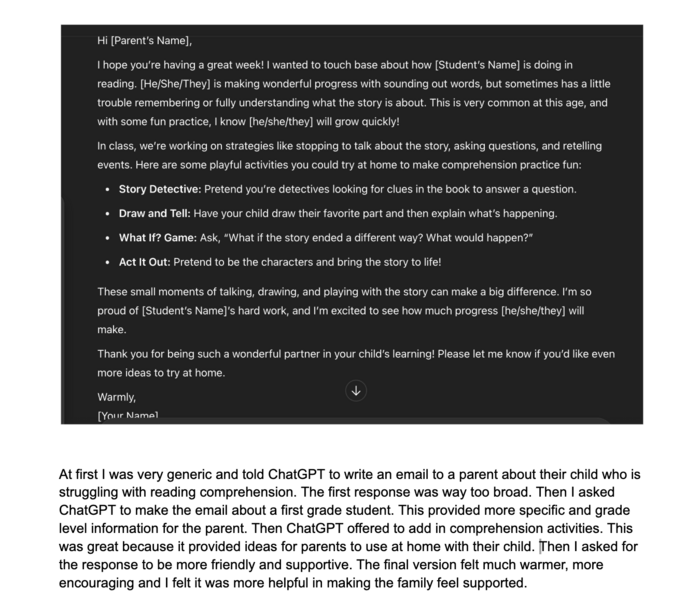
I started by asking ChatGPT to write a sample email to a parent of a 1st-grade student who was struggling with reading fluency. The first version was a bit too formal and didn’t sound like my voice, so I refined my prompt. I asked it to “make the tone warmer and more personal, as if a caring teacher was writing it,” and to “suggest a next step the parent could try at home.” After a few more edits asking it to include specific strategies (like practicing sight words or using decodable books), the final version felt natural and supportive, something I’d truly send. Next, I asked for a letter of reference for a student who was hardworking, had great character, and earned “citizen of the month.” The first version listed traits, but it felt generic. I prompted again, saying “use specific examples of how this student showed kindness and tried hard in class,” and added details like the student helping a classmate or turning in extra practice work. The final version felt authentic and personalized, which I could use in a real scenario.
brigid-kennedy 6 months ago